

bimmer-tool Lite
Kategorie : Auto & FahrzeugeVersion: 3.7.6
Größe:10.5 MBBetriebssystem : Android 4.2+
Entwickler:bimmer-tool
 Herunterladen
 Clear fault codes and monitor DPF status in BMW vehicles
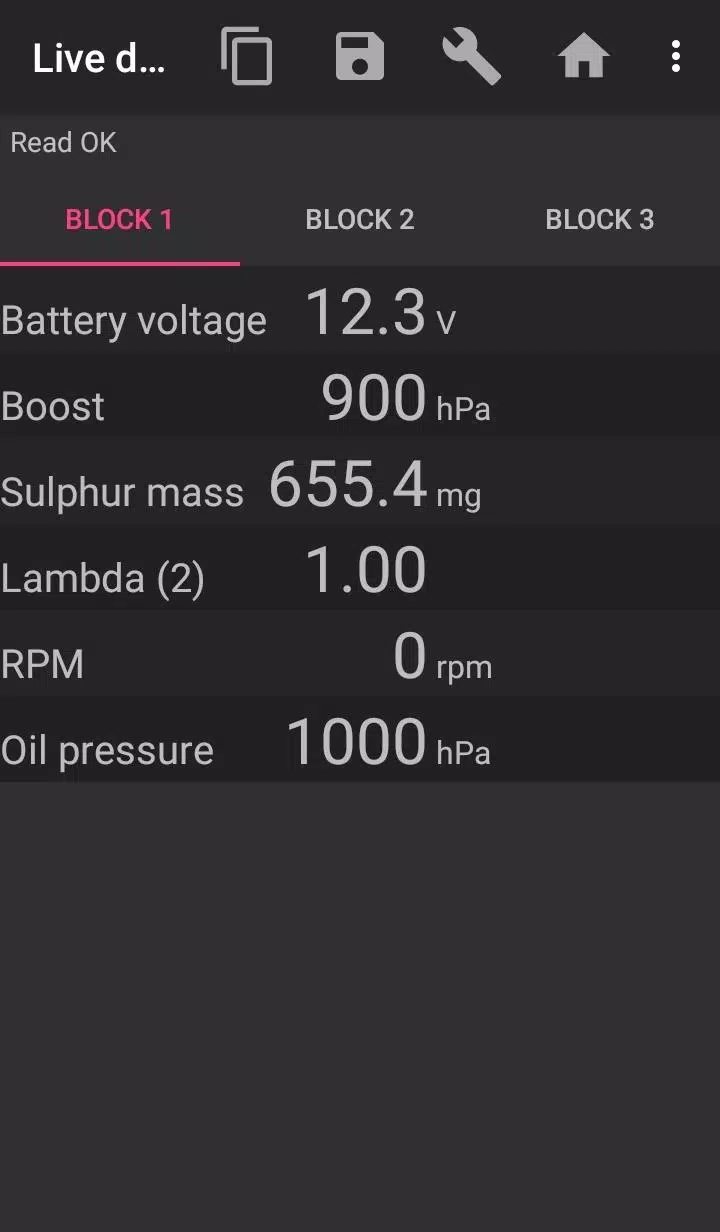
Bimmer-tool enables reading and clearing fault codes, initiating DPF regeneration, accessing live engine data, and performing various other functions in BMW cars.
For vehicles manufactured before model year 2008, application functionality is limited, and a K+DCan USB cable connection is recommended. Wireless ELM adapter connections may not be possible or may offer reduced functionality with pre-2008 models.
Important: This application requires a reliable OBD adapter. We recommend using a K+DCan cable, ENET adapter (for F/G series), or the following Bluetooth adapters:
- Vgate vLinker MC/FS/BM/FD https://www.vgatemall.com/products/
- UniCarScan UCSI-2000/USCI-2100: Select setting: D-Can mode: MODE2 https://www.wgsoft.de/shop/obd-2-komplettsysteme/unicarscan/114/unicarscan-ucsi-2000-diagnoseadapter
https://www.bmdiag.co.uk/unicarscan-ucsi-2000-bluetooth-obd2-adapter
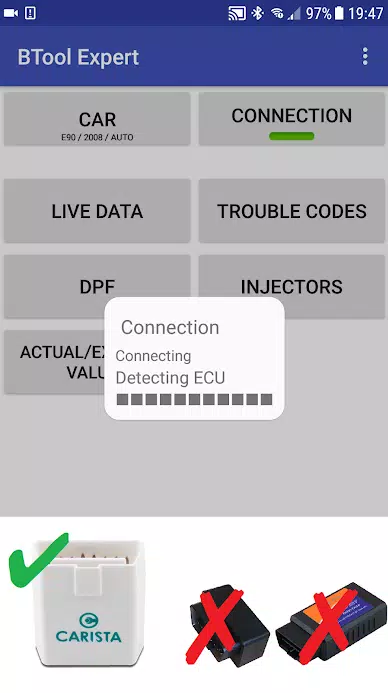
- Carista https://caristaapp.com/adapter
- Veepeak OBDCheck BLE https://www.veepeak.com/product/obdcheck-ble
Application capabilities include:
- Reading DPF regeneration status and detailed information
- Initiating DPF regeneration
- Resetting DPF adaptation values (required after filter replacement)
- Monitoring exhaust gas pressure
- Reading injector adjustments
- Accessing actual and expected values for air mass, intake manifold pressure, and fuel pressure
- Logging data to CSV files for analysis
- Registering battery replacement (without modifying battery properties)
- Resetting lamp circuits blocked due to short-circuit errors
- Resetting oil/brake service and maintenance intervals**
Supported OBD Adapters
- K+D-Can USB: This is the most reliable recommended adapter. Requires additional USB-OTG cable.
- ENET cable/WiFi Adapter: Recommended for F & G series. ENET cable connections require a USB-C to Ethernet adapter.
- ELM327 Bluetooth: Bluetooth connections may be slower than USB. Only genuine ELM327 or PIC18-based adapters are compatible. May not work with older engines. See additional information below.
- ELM327 WiFi: Similar to Bluetooth, WiFi connections may be less stable. On some devices, mobile data must be disabled to use WiFi adapters.
For questions or assistance, please email us using the address provided at the bottom of the page.
Quick Start Guide
1) Connect adapter to OBD II port
2) Turn ignition to ON position
3) Connect adapter to your phone:
* USB: Connect adapter to phone using USB-OTG cable. Select bimmer-tool when prompted.
* Bluetooth: Access phone Bluetooth settings, search for devices, and pair with adapter (PIN typically 0000 or 1234).
* WiFi: Disable mobile data, enable WiFi, and connect to adapter's network.
4) Launch app, navigate to 'Car' section, and select model/year
5) Go to 'Connection' and choose connection type, adapter, and protocol
6) Tap 'Connect' button
**Limitations:
For pre-2008 models and e46/e39/e83/e53 series, the app requires K+DCan cable connection and only supports engine ECU. Wireless ELM adapter connections may not be available.
Common Issues
- Occasional 'No response' errors in pre-2008 vehicles with BT/WiFi adapters. Try selecting ATWM in advanced connection settings if this occurs.
- Connection failures: If settings are correct but connection fails, force stop all diagnostic applications (including bimmer-tool) or restart your device and retry.
Why This App Requires Permissions
- Storage: Essential for USB adapter support
- Photos/Media/Files: Enables CSV file creation
- Bluetooth pairing/access: Required for Bluetooth adapter functionality
- Network access: Necessary for WiFi adapter operation
- Approximate location: While Bluetooth can theoretically determine location, this app does not access or use location data.
What's New in Version 3.7.6-L
Last updated on Nov 10, 2024
Diesel idle speed calibration
Throttle body control functionality



-
 Ultimate Leitfaden zur Produktivität: Apps für jede Aufgabe
Insgesamt 9 Spoken English Grammar app Learn Computer Course offline English Course Electronics Course JomStudy: Form 3 - 5 Study App Kids All in One (in English) TimeBlocks -Calendar/Todo/Note Lite Writer: Writing/Note/Memo WordUp | AI Vocabulary Builder
-


- PlayStation-5-Werbeanzeige war ein technischer Fehler Vor 1 Wochen
- Elden Ring Nightreign: Day-One-Patch bringt wichtige Updates Vor 1 Wochen
- Ubisoft plant neues „AAAA“-Spiel: Bericht Vor 1 Wochen
- Erscheinungsort der Graphic-Novel-Serie „Persepolis“ – Kreuzworträtsel-Hinweis - Try Hard Guides Vor 1 Wochen
- Schütteln Sie Ihren Stress einfach ab mit dem ASMR-Zen-Bubble-Popping-Puzzlespiel Relaxubble Vor 1 Wochen
- Legend of Myth: Neueste Einlöse-Codes (Januar 2025) Vor 1 Wochen
-

Business Office / 1.5.59 / by BGCI / 38.70M
Herunterladen -

Unterhaltung / v19.11.38 / by Vanced / 95 MB
Herunterladen -

Unterhaltung / 1.1 / by HabibiWallpapers / 22.8 MB
Herunterladen -

Werkzeuge / 2.1 / by Appwise OÜ / 12.00M
Herunterladen -

Werkzeuge / 1.0 / by SM technology / 10.39M
Herunterladen -

Auto & Fahrzeuge / 2.5.4 / by Lexus Mobile Apps / 154.5 MB
Herunterladen -

Kommunikation / 6.62.1 / by CONSTRUCT TECHNOLOGY PTE. LTD. / 109.85 MB
Herunterladen -

Werkzeuge / 3.3.9 / by 大乘科技(SSK) / 72.90M
Herunterladen
-
 So beheben Sie, dass Marvel Rivals beim Start langsame Shader kompiliert
-
 Wie man den Pfad der Tapferkeitstruhe in Assassins Creed -Schatten bekommt
-
 "Retten Sie Ihr Spiel in Repo: einen Leitfaden"
-
 "Clair Obscur: Expedition 33 Verlag lobt Oblivion Remastereds Auswirkungen auf das RPG -Rampenlicht"
-
Beste Lernspiele für Erwachsene: Brain Training & Fähigkeitsentwicklung (Puzzlespiele)
-
 "Clair Obscur: Expedition 33 Entwickler kündigen ein neues Spielprojekt an"