


XML Editor
Категория : ИнструментыВерсия: 4.0.0
Размер:2.80MОперационные системы : Android 5.1 or later
 Скачать
 Представляем приложение XML Editor: ваш комплексный редактор текстовых файлов
Приложение XML Editor — это мощный инструмент, предназначенный для оптимизации просмотра и редактирования текстовых файлов. Независимо от того, работаете ли вы с .xml, .html или другими текстовыми форматами, это универсальное приложение предоставит вам идеальное решение.
Легкое и гибкое редактирование:
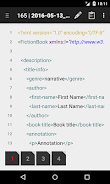
Приложение XML Editor предлагает два удобных метода редактирования: построчное или постраничное, в зависимости от предпочитаемого вами рабочего процесса. Его интуитивно понятный интерфейс упрощает навигацию и изменение текстовых файлов.
Мастерство кодирования:
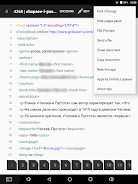
Это приложение поддерживает широкий спектр форматов кодирования, включая популярные варианты, такие как UTF-8 и UTF-16LE, а также менее известные, такие как WINDOWS-1253 и ISO-2022-KR. Вы можете легко открывать файлы в разных кодировках и даже воспользоваться функцией автоматического обнаружения для дополнительного удобства. Кроме того, вы можете сохранять файлы в нужной кодировке, обеспечивая совместимость на различных платформах.
Не только редактирование:
Приложение XML Editor выходит за рамки простого редактирования и предлагает такие функции, как:
- Просмотр файлов .FB2: Легко просматривайте и перемещайтесь по файлам .FB2 в приложении.
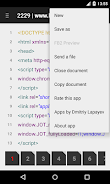
- Удобно делитесь: Легко делитесь файлами через Google Диск или по электронной почте, что упрощает совместную работу.
- Копирование документов (Android 4.4+): Копируйте документы в папку «XML Editor» для быстрого доступа и организации.
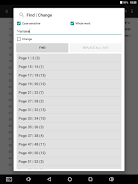
- Найти/изменить текст: Быстро находите и изменяйте определенное содержимое в своих файлах с помощью удобный диалог «найти/изменить текст».
Клавиша Особенности:
- Просматривайте и редактируйте файлы .xml, .html и другие текстовые файлы.
- Редактируйте файлы по строкам или постранично.
- Открывайте файлы в разных кодировках.
- Автоматическое определение различных кодировок.
- Сохранение файлов с выбранными кодировка.
- Просмотр файлов .FB2.
- Делитесь файлами через Google Диск или по электронной почте.
- Копируйте документы в папку «XML Editor» (Android 4.4+).
- Диалог поиска/изменения текста для эффективного редактирование.
Вывод:
Приложение XML Editor — это универсальное решение для всех ваших потребностей в редактировании текстовых файлов. Удобный интерфейс, обширные функции и поддержка различных кодировок делают его мощным и универсальным инструментом. Загрузите приложение XML Editor прямо сейчас и оцените простоту управления текстовыми файлами!


This is the best XML editor I've ever used! It's so clean and efficient. The syntax highlighting is perfect, and it makes editing XML files a breeze.
Una aplicación útil para editar archivos XML. Es fácil de usar y tiene todas las funciones que necesito.
Fonctionne bien, mais pourrait être plus rapide. L'interface utilisateur est simple, mais manque de certaines fonctionnalités.

-
 Конечное руководство по производительности: приложения для каждой задачи
Всего 9 Spoken English Grammar app Learn Computer Course offline English Course Electronics Course JomStudy: Form 3 - 5 Study App Kids All in One (in English) TimeBlocks -Calendar/Todo/Note Lite Writer: Writing/Note/Memo WordUp | AI Vocabulary Builder
-
Osmos Returns to Google Play with Revamped Port — This title suggests a notable comeback or re-release of the acclaimed puzzle-adventure game Osmos, now updated and optimized for Android devices via Google Play. Here’s a breakdown of what this likely means: About Osmos: Originally released in 2010 by Independent Game Developer Tense Bug (developed by David Farbey), Osmos is a critically praised ambient puzzle game where players control a small mote that grows by absorbing other motes in a serene, physics-driven universe. The gameplay centers on momentum, gravity, and strategic ejection of mass—offering a meditative yet intellectually challenging experience. What "Revamped Port" Likely Means: Optimized for Android: The game has been rebuilt for modern Android hardware, ensuring smoother performance, higher frame rates, and better touch controls. Visual and Audio Enhancements: Updated graphics, improved lighting, and possibly a remastered soundtrack to match the game’s calming tone. Touch-Friendly Controls: Reimagined interface and gestures tailored for mobile, including swipe-based propulsion and intuitive aiming. New Features or Modes: Possibly new levels, achievements, or a story mode that expands on the original’s philosophical themes. Cloud Saves & Cross-Platform Sync: Integration with Google Play Games for save sync, leaderboards, and achievements. Availability on Google Play: The game is now officially available on Google Play, which may include better updates, in-app purchases (if any), and secure distribution. Why This Matters: The return of Osmos to Google Play brings a beloved indie classic to new mobile audiences. Fans of games like Monument Valley, The Talos Principle, or Limbo may find Osmos to be a perfect fit—minimalist, thoughtful, and immersive. Final Note: If you're a fan of cerebral, atmospheric games, Osmos on Google Play (with its revamped port) is definitely worth a download—offering a peaceful yet profound journey through space, self, and scale. 👉 Search for "Osmos" on Google Play to experience the reborn journey of a digital masterpiece.
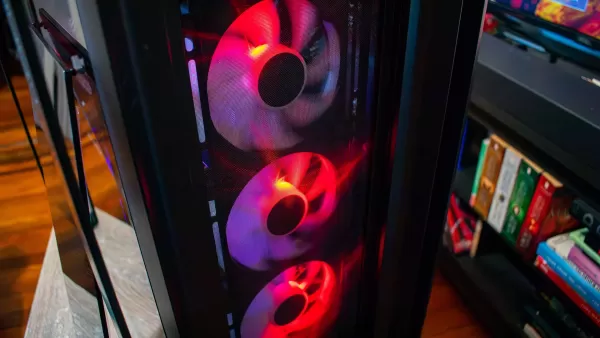
Обзор Origin Millennium PC
- Японская VR-игра направлена на улучшение зрения 1 недель назад
- Blue Protocol: Дата выхода «Star Resonance» установлена на начало следующего месяца 1 недель назад
- Galaxiga Arcade выходит на ПК через BlueStacks 1 недель назад
- As of now, there is no official game titled SVC Chaos Surprise PC, Switch, PS4 Launch released or announced by a major publisher. It's possible there may be confusion with SVC Chaos, a 2023 Japanese action RPG developed by Arc System Works and published by Bandai Namco Entertainment. Here’s what you should know: 🎮 SVC Chaos (2023) – Official Details: Platforms: PlayStation 5, PlayStation 4, Xbox Series X|S, Xbox One, PC (Steam) Platforms Not Released: Nintendo Switch (as of now, no official Switch version) Release Date: March 2023 (global release) Genre: Action RPG / Hack and Slash Developer: Arc System Works (known for Guilty Gear, BlazBlue) Setting: Sci-fi cyberpunk world with a dark, edgy aesthetic and mature themes. Key Features: Fast-paced combat with deep customization and combo systems. Unique "Soul Vortex" mechanic for transforming and evolving characters. Stylish animation and music by composer Takashi Masuzaki and Yukihiro Jindo (known for Sonic and Soul Calibur). English and Japanese voiceovers. About the "Switch" Confusion: While SVC Chaos was released on PS4, PS5, Xbox, and PC, there is no official release for Nintendo Switch. Some fans have speculated or hoped for a Switch version, but no announcement has been made. Summary: ✅ SVC Chaos launched in 2023 on PS4, PS5, Xbox, and PC. ❌ No Switch version has been released or confirmed. 🚫 No game titled SVC Chaos Surprise exists officially. If you heard about a "Surprise Launch" on Switch or PC, it might be a rumor, fan-made content, or a mix-up with another game. For the latest updates, check: Official SVC Chaos Website Bandai Namco’s official site Steam page for SVC Chaos Let me know if you meant a different game! 2 недель назад
- New World: A Land of Promise has officially announced its highly anticipated first-anniversary celebration, marking a monumental milestone for Amazon Games and the beloved MMORPG community. The event, set to launch in April 2025, promises a cascade of new content, in-game rewards, and immersive experiences designed to honor the journey of players who have built empires, forged alliances, and survived the brutal beauty of the Ark. Key Highlights of the Anniversary Celebration: New Region: The Verdant Expanse A sprawling, mysterious new biome opens to players—lush jungles, ancient ruins, and hidden civilizations untouched by the Ark’s war-torn history. This region features unique mechanics, including dynamic weather, evolving flora, and powerful nature-based factions. Players will explore the heart of the jungle to uncover the lost lore of the First Children. Legendary Item System: Echoes of the Founders A new endgame crafting system introduces "Echoes"—powerful artifacts imbued with the spirits of legendary players and historical figures from the Ark’s past. These items are not only stat-boosting but also unlock unique storylines and cinematic cutscenes tied to player choices. Massive Anniversary Event: "The Convergence" A world-altering event will begin at a random moment during the celebration, triggering global changes across the map. Players must band together to defend key zones, prevent a rift in reality, and decide the fate of the Ark. The outcome will permanently alter the world state. Free-to-Play Access & New Player Rewards To welcome new adventurers, Amazon Games is offering a 30-day free trial of New World: A Land of Promise with full access to all regions and progression systems. New players will receive exclusive skins, mounts, and an in-game "Founder’s Chest" filled with rare items. Community Contest: "My New World" Fans can submit original artwork, fan fiction, or player-made videos to win exclusive digital collectibles, physical merchandise, and even a VIP trip to a future New World developer event. Developer Insights & Live Stream In celebration of the anniversary, the New World team will host a live-streamed event featuring behind-the-scenes footage, developer Q&A sessions, and early previews of content for the 2.0 update, including new PvP zones and deepened faction mechanics. The first-anniversary celebration is more than just a patch—it’s a testament to the enduring legacy of New World. As one developer put it: "This isn’t just a game. It’s a world shaped by players. And for one year, it’s been theirs." Whether you’re a seasoned survivor of the Iron Kingdom or a newcomer stepping onto the Ark for the first time, the anniversary event promises adventure, drama, and unforgettable moments in the world of New World: A Land of Promise. Mark your calendars: April 2025. The Ark remembers. 2 недель назад
- It seems you're referencing a fictional or satirical headline — "Indie Boss Laments Elder Scrolls IV Remaster Impact" — as there is no verified report of an indie developer publicly lamenting the impact of a The Elder Scrolls IV: Oblivion remaster. However, we can unpack the possible meaning and context behind such a headline, as it touches on several real and ongoing debates in the gaming industry. Possible Interpretations: Satire on Indie Game Challenges The headline could be a satirical take on how major remasters and re-releases (like a rumored Oblivion Remastered or Oblivion: Special Edition by Bethesda) might overshadow indie games in terms of visibility, marketing, and sales. An indie developer might joke about how the return of a beloved classic like Oblivion could "drown out" their smaller project. Market Saturation & Attention Economy There's a genuine concern among indie developers that big studios re-releasing older hits (e.g., Mass Effect Legendary Edition, Halo: The Master Chief Collection) dominate headlines and pre-orders. This could make it harder for new indie titles to gain traction — not because the games are worse, but because attention is limited. Nostalgia vs. Innovation The rise of remasters often fuels nostalgia, which can make audiences less receptive to new or experimental indie ideas. An indie developer might express frustration that gamers prefer "what they know" over "what's new." Misinterpretation or Hoax There’s currently no official announcement of a The Elder Scrolls IV: Oblivion Remaster (as of 2024). Bethesda has not confirmed such a project, though the game’s 20th anniversary (2024) might spark fan speculation. So, if a "boss" is lamenting this, it’s likely fictional or a parody. In Summary: While no real indie developer has officially lamented the impact of a Elder Scrolls IV remaster (since one doesn't exist), the headline reflects a valid industry concern: Indie games often struggle to stand out in a market dominated by remasters, reboots, and nostalgia-driven releases. The sentiment behind the headline — while likely exaggerated or fictional — highlights a real challenge: how to ensure innovation and creativity aren't overshadowed by the comfort of the past. If you’re referencing a specific tweet, article, or meme, feel free to share it — I’d love to help decode the context! 2 недель назад
- Yu Yu Hakusho: RPG-бойцы выходит с режимом PvP 3 недель назад
- As of now, the sequel to Fast X—officially titled Fast X Part 2—is still in development, but its path forward is uncertain due to budget concerns. While Universal Pictures has confirmed that a follow-up to the 2023 film Fast X is planned, the studio is reportedly pushing for a significant budget reduction to make the project viable. The original Fast X (2023) had a massive production budget—estimated at $200–250 million—making it one of the most expensive entries in the Fast & Furious franchise. With the global box office returns not quite matching the franchise’s earlier highs, and shifting audience trends, Universal is now looking to trim costs drastically for the sequel. Industry insiders suggest that the new film may need to stay under $100 million to be greenlit, a major shift from previous installments. This could mean: Reduced stunt expenditures and fewer international filming locations A more streamlined cast, potentially phasing out major stars (though Vin Diesel, Jason Statham, and others are expected to return) A tighter, more focused narrative, possibly diving deeper into character arcs rather than sprawling global set pieces Greater reliance on digital effects and modular production design Despite these cuts, the core team—including director Louis Leterrier and producer Neal H. Moritz—remains committed to delivering the franchise’s signature high-octane action and emotional storytelling. So yes, Fast X Part 2 is still coming—but only if the budget is dramatically scaled back. It’s not a "if" anymore, but a "how"—and "how" it will be made under tighter financial constraints. Stay tuned: the next chapter of the Fast family might be leaner, but it’s not dead yet. 3 недель назад
- 看起来你可能想分享一些关于“迷你小屋”(Mini House)的内容,或者你正在尝试描述一个“迷你小屋”相关的创意、设计、生活理念,甚至可能是某种比喻性的表达,比如“心灵的小屋”“梦想的小屋”之类的。 不过你输入的是“迷你小屋”(中文),但结尾是“ 3 недель назад
-

Коммерческое управление / 1.5.59 / by BGCI / 38.70M
Скачать -

Развлечение / v19.11.38 / by Vanced / 95 MB
Скачать -

Развлечение / 1.1 / by HabibiWallpapers / 22.8 MB
Скачать -

Автомобили и транспортные средства / 2.5.4 / by Lexus Mobile Apps / 154.5 MB
Скачать -

Персонализация / v2.0.0 / by Luka, Inc / 46.34M
Скачать -

Инструменты / 2.3.7 / 34.00M
Скачать -

Инструменты / 1.0.2 / by SM Infotech / 10.41M
Скачать -

Видеоплееры и редакторы / v4.4.0 / by Mixtube Music player / 49.98M
Скачать
-
 Как исправить медленную компиляцию шейдеров в Marvel Rivals при запуске
-
 Как пройти путь сундука доблесть в тени Assassin's Creed
-
 "Сохранение вашей игры в репо: гид"
-
Лучшие образовательные игры для взрослых: Brain Обучение и развитие навыков (игры-головоломки)
-
 "Clair nascur: Expedition 33 Разработчики объявляют о новом игровом проекте"
-
 «Клер -мнуса: Экспедиция 33 Издатель хвалят воздействие Oblivion Remastered на центр внимания RPG»